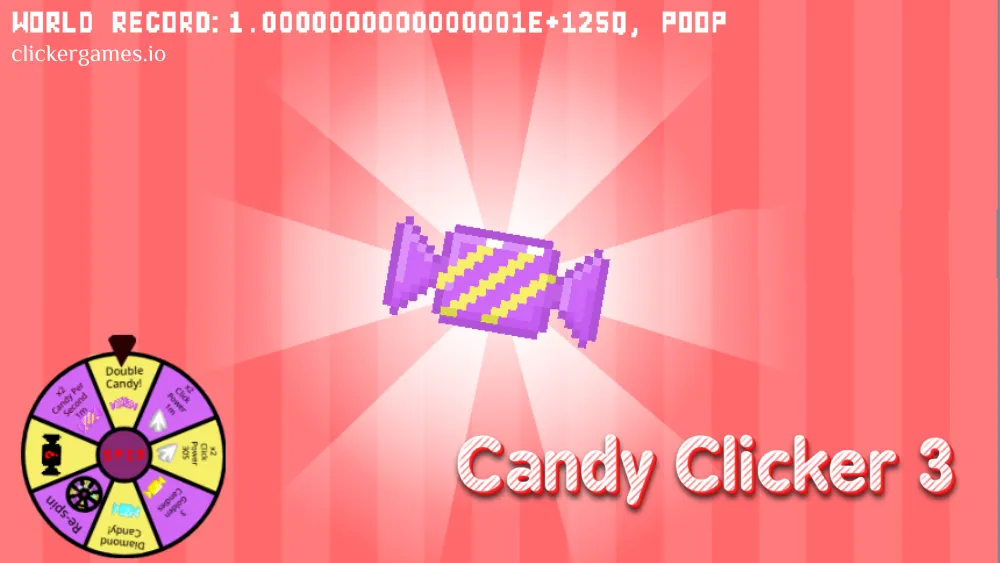
Candy Clicker 3 is the third entry in the candy idle series, and it’s the best-tuned one yet: faster progression, a more balanced economy, and cleaner graphics than its predecessors. You start by clicking a giant candy in the center of the screen. Every click adds to your stash, and that stash buys the upgrades — auto clickers, candy farms, candy mines — that turn manual tapping into a self-running candy factory. The fun is in that transition: one minute you’re hammering the candy yourself, and before long you’re managing an operation that produces sweets while you watch the numbers climb. Golden candies spice up the wait, appearing at random with boosts that scale with your production, and the whole thing runs free in any browser with automatic saving.
What Is Candy Clicker 3?
Candy Clicker 3 is a free browser clicker game and the most refined entry in its series. Where the earlier candy clickers laid down the basic tap-and-upgrade loop, the third game tightens everything around it: progression moves faster, the economy is better balanced so no single purchase trivializes the game, and the graphics got a proper cleanup. If you’ve played a Scratch version of Candy Clicker, note the difference — those are fan-made, while this is the polished standalone edition with faster load times, better performance, and working save functionality, no TurboWarp required.
The design follows the classic Cookie Clicker blueprint — big clickable object, upgrade shop, automation tiers — and adds its own signature system in the golden candies. They appear randomly, tend to show up every one to two minutes, and grabbing one delivers a massive point boost that scales with your current production. That scaling detail quietly changes how you play: a golden candy late in a run is worth vastly more than one at the start, so staying near the screen keeps paying better the bigger your factory gets.
Rounding it out are unlockable candy skins for customizing the look of your game, automatic saving to your browser’s local storage, and mobile-optimized controls. It’s free, needs no registration, and is tuned to run on school and office networks — which is why it sits in our unblocked games collection.
How to Play Candy Clicker 3
On PC, everything runs off the left mouse button. On mobile, just tap the screen. The game works the same either way and is optimized for both.
Controls
- Left mouse button — click the giant candy to earn, and click shop items to buy
- Tap — on phones and tablets, tapping replaces clicking entirely
Your first session looks like this:
- Click the candy. Tap the large candy icon in the center to start earning.
- Open the shop. As soon as you have enough points, check the upgrade menu on the right side of the screen.
- Buy automation. The Auto Candy feature keeps production running even when you aren’t clicking — get it early.
- Grab skins. Spare points can go toward candy skins that customize the look of your game.
- Watch your stats. Keep an eye on your candies-per-click number to see how your growth rate is trending and what to upgrade next.
From there the game becomes a management loop: click during the active moments, buy the upgrade with the best return, and let the factory handle the rest.
Candy Clicker 3 Strategy Guide
Early Game
The opening minutes are all raw clicking, so your hardware genuinely matters: a physical mouse clicks noticeably faster than a laptop trackpad, and early on, click speed is your whole economy. Hammer the candy, then follow the proven opening order — basic Cursor upgrades first, then jump straight to the Candy Farm, which has the best return on investment in the early game.
Get the Auto Candy feature running as early as you can. It’s the dividing line between a game you have to play and a game that plays for you.
Mid Game
With automation online, your job shifts from clicking to capital allocation. The candies-per-click stat (and your overall production rate) tells you whether your buys are working — check it before and after purchases and favor whatever moves it most per point spent. Don’t spread points thin: putting money into the strongest producers, like the Cursor and the Candy Mine, expands your factory faster than buying a little of everything. That payback-first thinking is the core skill of the whole genre — our Cookie Clicker strategy guide covers the same logic in more depth.
Mid game is also peak golden candy season. They tend to appear every one to two minutes, and because their boost scales with your production, each one is now worth serious points. Stay at the screen during active sessions; missing one late costs far more than missing one early.
Late Game / Completion
Candy Clicker 3 doesn’t have a prestige reset — its endgame is scale and completion. Idle games are theoretically endless, but the practical finish line here is unlocking every secret ingredient and skin while pushing your production toward record territory. By this stage your farms and mines do the heavy lifting, so the optimal pattern is long idle stretches with short active check-ins: keep the tab open (production continues in the background as long as it is), return to spend the accumulated stash, catch a golden candy or two, and leave again. The numbers keep climbing either way — getting there is the game.
Upgrades & Progression
The shop sits on the right side of the screen, and its items sort into a clear hierarchy:
| Upgrade | Role | Notes |
|---|---|---|
| Cursor | Stronger clicks and a top-tier producer | Your first buys — and still worth investing in late |
| Auto Candy | Keeps production running without clicking | The earliest automation; get it as soon as possible |
| Candy Farm | Automated production | Best return on investment in the early game |
| Candy Mine | Heavy automated production | One of the strongest producers for late-game scaling |
| Candy skins | Cosmetic customization | Spend spare points here once production is healthy |
Two systems sit alongside the shop. Golden candies are the random-event layer: spawning roughly every one to two minutes, each grants a huge boost that scales with your current production, effectively rewarding both active attention and factory size at once. And the candies-per-click stat is your compass — it makes growth measurable, so you can see exactly which upgrades are pulling their weight and what to buy next.
The overall arc: Cursors carry your clicks, Auto Candy and the Farm hand the work to automation, the Mine takes production into the big numbers, and skins plus secret ingredients give completionists something to hunt after the economy is humming.
When choosing between producers, the balanced economy actually matters: because no single building trivially outclasses the rest, the right buy is usually whichever gives the biggest production increase per point at your current scale — which shifts over a run. Early on that’s Cursors and the Farm; later the Mine’s raw output justifies its price tag. If two options look close, take the cheaper one; it starts paying back sooner, and in a compounding economy, sooner beats bigger more often than you’d think.
Features
- Refined third edition with better graphics and a more balanced economy than earlier games
- Golden candies that spawn randomly and grant boosts scaling with your production
- Full automation path: Auto Clickers, Candy Farms, and Candy Mines
- Unlockable candy skins for customizing your game
- Candies-per-click stat tracking to guide your upgrade decisions
- Automatic saving to your browser’s local storage
- Works on PC and mobile with no download or registration
- Free and unblocked, tuned to run on school and office networks
Tips & Tricks
- Use a real mouse if you can. A physical mouse clicks noticeably faster than a laptop trackpad, and in the early game raw click speed is your whole economy.
- Stay at the screen for golden candies. They tend to show up every one to two minutes. Since their boost scales with your production, missing one late in a run costs far more than missing one early.
- Get the upgrade order right. Start with the basic Cursor upgrades, then jump straight to the Candy Farm — it has the best return on investment in the early game.
- Buy automation before anything cosmetic. Auto Candy keeps the factory earning while you’re away; skins can wait until your production is healthy.
- Keep the tab open. Your farms and mines keep working in the background as long as the browser tab stays open, so leave it running while you do other things.
- Prioritize high-yield purchases. Don’t spread points thin. Putting money into the strongest producers, like the Cursor and the Candy Mine, expands your factory faster than buying a little of everything.
- Watch your candies-per-click. It’s the clearest signal of whether your growth rate is trending up and which upgrade deserves the next pile of points.
- Don’t fear closing the browser. Progress saves automatically to local storage on your device, so your factory is exactly where you left it when you come back.
Games Like Candy Clicker 3
- Candy Clicker 2 — the previous entry in the series, with the same sweet loop in an earlier form.
- Candy Clicker — the original that started the series, worth a look to see how far the formula has come.
- Cookie Clicker — the genre’s blueprint: golden-object events, automation tiers, and endless scaling all started here.
- Sweet Clicker — another dessert-themed tapper if you want the candy vibe with a different upgrade tree.
FAQ
Where can I play Candy Clicker 3 for free?
Right here on clickergames.io. It’s completely free, with no registration and no downloads — the game runs directly in your browser.
Does Candy Clicker 3 save my progress?
Yes. Your candy empire is saved automatically in your browser’s local storage. Close the tab, come back later, and your factory picks up exactly where you left it.
Does Candy Clicker 3 work on mobile?
Yes. The game is optimized for both PC and mobile — on a phone or tablet you simply tap the screen instead of clicking, and everything else works the same.
How often do golden candies appear?
They spawn randomly, but tend to show up every one to two minutes. Their boost scales with your current production, so they get more valuable the bigger your factory grows.
How is this different from the Scratch versions?
Candy Clicker 3 Scratch versions are fan-made. This is the polished standalone edition, with faster load times, better performance, and working save functionality — no TurboWarp required.
Can you beat Candy Clicker 3?
Idle games are theoretically endless, but the practical finish line is unlocking every secret ingredient and skin and pushing your production toward record territory. Getting there is the game.