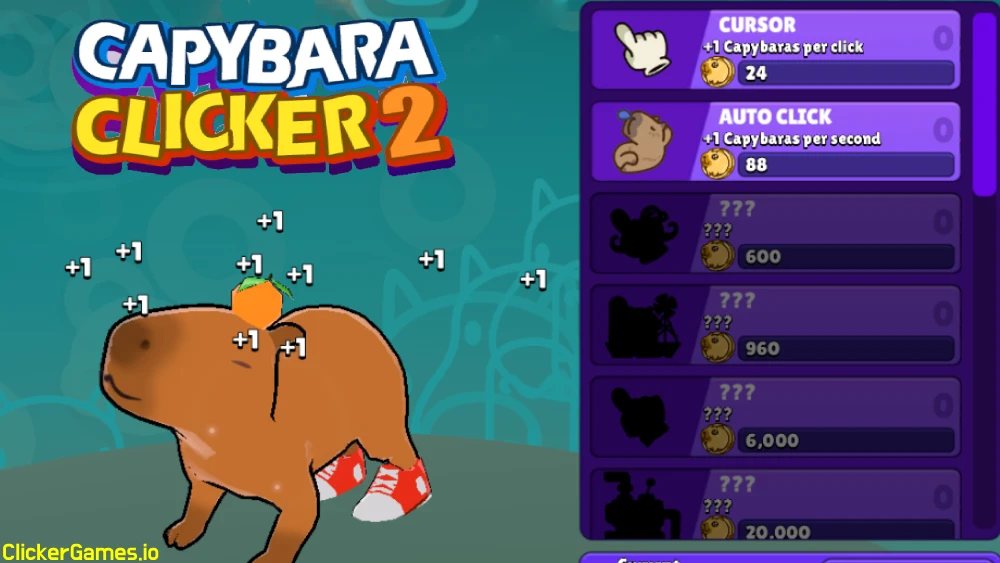
Capybara Clicker 2 is the sequel to one of the most popular animal clickers around, and it sticks to what worked: tap a capybara, earn gold coins, and spend those coins on upgrades that make every tap worth more. What starts as a single coin per click can eventually snowball into billions of points per second. The sequel adds the stuff the first game was missing — an energy bar that doubles your prizes, a changing weather system, a wardrobe of outfits and accessories, and a capybara family that keeps multiplying the longer you play. It is the kind of game you open for five minutes and close an hour later.
What Is Capybara Clicker 2?
Capybara Clicker 2 is the follow-up to the animal clicker that rode the capybara meme wave to enormous popularity. The series originally came from Crazy Games, and this sequel carries over one of its nicest touches: the soundtrack by Radiocosmo, which makes long clicking sessions surprisingly relaxing. The formula is unchanged at its core — a big friendly rodent, a coin counter, and an upgrade list — but the sequel layers new systems on top that give your tapping more texture.
The headline additions are the energy bar, which fills as you tap and doubles your prizes when full; a dynamic weather system that changes the scene while you play; a bigger wardrobe of skins and accessories for dressing up your capybara; and a steady drumbeat of achievements that give your clicking direction beyond raw numbers. Progression still runs through leveling, and the key unlock is automatic clicking, which turns the game from an active tapper into a proper idle empire.
It runs directly in your browser with no download, works the same on desktop, phone, and tablet, and sits comfortably in the new clicker games wave while being friendlier than most. If you want the full family history, the Capybara Clicker complete guide covers both games.
How to Play Capybara Clicker 2
Everything revolves around one action.
- On desktop: click the capybara with your mouse to collect gold coins.
- On mobile: tap the screen to collect coins.
Start clicking and coins begin to pile up. Spend them on upgrades — each one raises how much you earn, so the game speeds up the more you invest. A few systems open up as you go:
- The energy bar. Tapping fills it, and a full bar doubles your prizes. Early on, this is the fastest way to grow your coin count.
- Automatic clicks. As you level up, you unlock auto-clicking that keeps earning even when you are not playing. This is the point where the game shifts from active tapping to idle empire management.
- Skins and accessories. New looks for your capybara unlock as you progress. They are cosmetic, but hitting a big goal and watching your capybara do a silly dance in a new outfit is half the charm.
- Achievements. There is a steady stream of goals to chase, which gives your clicking some direction beyond raw numbers.
Your early goals are simple: buy your first earning upgrades, learn the rhythm of the energy bar, and level toward automatic clicks — the unlock that changes everything about how the game plays. Do not stress over making a wrong purchase in the opening minutes; the costs are tiny at that stage, and any upgrade you buy feeds the compounding that carries you forward. The habits that matter — spending promptly, watching the energy bar, keeping a next goal in mind — are worth more than any individual early buy.
Controls
- Mouse: left-click the capybara to collect coins; click menus to buy upgrades, skins, and accessories
- Touch: tap the screen to collect; tap menus to spend
- One input runs the whole game — no keyboard required
Capybara Clicker 2 Strategy Guide
Early Game
The energy bar is your early-game superpower. Doubled prizes compound into every purchase you make afterward, so tap in focused bursts that keep the bar topped up rather than idly poking the screen. Put your first coins into the upgrades that raise your earnings most per coin spent — the standard incremental rule of buying by payback, not by price. Every upgrade makes the next one arrive faster, so early efficiency snowballs through the whole run.
Mid Game
Your medium-term goal has one name: automatic clicks. Manual tapping only scales so far, and once auto-clicking is unlocked your coins grow even while the tab is closed, so leveling toward it should shape your mid-game spending. Once it is running, the game becomes a check-in loop — return, collect, reinvest, and push your points per second higher. This is also when the cosmetic layer opens up properly: skins and accessories unlock as you progress, and rotating outfits keeps long sessions fresh while you grind levels.
Late Game
Late game is about scale — pushing from thousands into billions of points per second — and about completion: the full wardrobe, the achievement list, every weather scene. Keep clearing upgrades as they become affordable, keep collecting idle earnings promptly so they go back to work, and use the achievements as a to-do list when the raw number stops being motivation enough. There is no cheat shortcut here, and the game does not need one; steady investment in upgrades is genuinely the fastest way to progress.
Upgrades & Progression
Capybara Clicker 2’s progression systems stack like this:
| System | How it unlocks | What it does |
|---|---|---|
| Earning upgrades | Buy with coins | Raise coins per click and per second — the economic core |
| Energy bar | Fills as you tap | Doubles your prizes when full; the early-game accelerator |
| Automatic clicks | Unlocked by leveling up | Earns while you are away; converts the game to idle play |
| Skins & accessories | Unlock through progress | Cosmetic outfits, backgrounds, and capybara dances |
| Achievements | Hit milestones | A steady goal stream beyond the raw counter |
| Weather | Changes as you play | Dynamic scene changes that keep sessions varied |
The economic spine is the upgrade list — every purchase raises your earning rate, and costs scale up so there is always a next target. The energy bar rewards active play on top of that, automatic clicks reward absence, and the cosmetics and achievements give the whole climb a personality. The weather system rounds it out: pay attention to the changes and work them into your session rhythm instead of ignoring the backdrop.
What makes the mix work is that the systems reward different moods. Some sessions you want to actively tap and ride the energy bar; other days you just want to open the tab, collect what the auto-clicker earned, buy an upgrade, and close it again. Both styles make real progress, which is rarer than it sounds — plenty of clickers quietly punish one or the other. Here the active player and the idle player climb the same ladder at their own pace, and the capybara does its little dance for both of them.
Features
- Tap-to-earn core loop that scales from one click to billions of points per second
- Energy bar that doubles your prizes when filled
- Dynamic weather that changes the scene while you play
- Skins, accessories, and colorful backgrounds to customize your capybara
- Achievements to unlock as you hit new milestones
- Automatic clicking unlocked through leveling, so progress continues offline
- Runs free in the browser on desktop, mobile, and tablet — no download needed
- Music by Radiocosmo
Tips & Tricks
- Fill the energy bar before anything else. Doubled prizes early in a run compound into every purchase you make afterward, so keep that bar topped up.
- Push toward automatic clicks. Manual tapping only scales so far. Once auto-clicking is unlocked, coins grow even while the tab is closed — make reaching it your first medium-term goal.
- Click with a plan. Random tapping works, but timing your bursts around the energy bar and your current upgrades earns noticeably more per session.
- Buy by payback, not by price. The cheapest upgrade is not always the best one. Favor whatever raises your earning rate most for the coins spent.
- Use the weather. Weather changes are not just decoration — pay attention to them and work them into your play instead of ignoring the backdrop.
- Rotate your skins. Trying different outfits and backgrounds keeps long sessions fresh, and collecting them all is a goal in itself.
- Collect idle earnings promptly. Coins earned while you were away do nothing until they are reinvested. Check in, collect, spend, repeat.
- Do not hunt for cheats. There are none. Steady investment in upgrades is genuinely the fastest way to progress.
Games Like Capybara Clicker 2
- Capybara Clicker — the original: same adorable rodent, with golden capybara hunts and a huge skin ladder.
- Cookie Clicker Old — the classic that invented this loop; trade your capybara for a giant cookie and grandmas.
- Kiwi Clicker — an animal clicker with a full production line, boss fights, and prestige for players who want more systems.
- Panda Clicker — another cute-animal tapper in the same cozy spirit.
FAQ
Is Capybara Clicker 2 free to play?
Yes, the game is completely free. There are optional in-game purchases, but nothing you need to buy to enjoy it or progress.
Can I play Capybara Clicker 2 unblocked?
Yes. The version here on clickergames.io is unblocked, so it works on school and work networks during breaks — no downloads or workarounds required.
Is there a mobile app version?
There is. Android users can grab it from the Google Play Store, and iPhone or iPad users can install it from the App Store. Android players without Play Store access can also download the APK from a trusted site — just remember to enable installations from unknown sources in your settings first. The browser version plays fine on mobile too.
How do I unlock automatic clicking?
Level up. Auto-clicking unlocks as you progress, and once you have it, your coins keep growing even when you are not playing — including while the tab is closed.
What does the energy bar do?
Tapping fills it, and a full bar doubles your prizes. Keeping it topped up is the fastest way to grow your coin count in the early game.
Are there cheats for Capybara Clicker 2?
No. Your best route to fast progress is focusing coins on upgrades and unlocking automatic clicks as early as you can.